Sign In & Account
AbayMart Website
6.1 Signing In
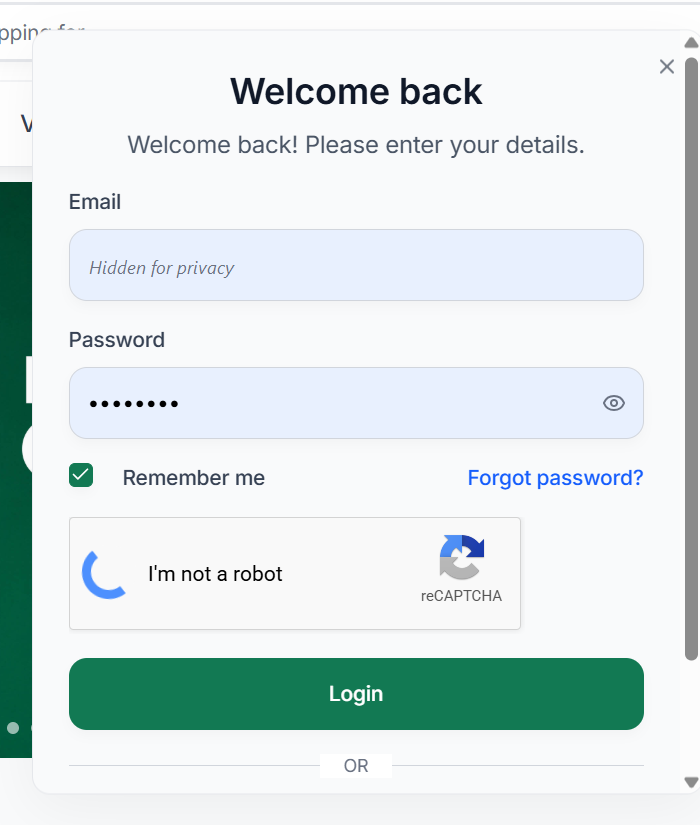
Customers with an Abay Mart account can sign in to access account-related services.
- Select Sign in from the website navigation.
- Enter the required account details.
- Complete the security verification if requested.
- Select Login.
The Sign In page includes a reCAPTCHA security verification to help protect the login process.
6.2 Forgot Password
If you cannot remember your password, select Forgot Password? on the Sign In page and follow the password recovery instructions.
6.3 Sign In with Google
The login page also provides Sign in with Google, allowing you to use your Google account where applicable.
6.4 Creating a New Account
If you do not have an account, select Sign up for free on the Sign In page and follow the registration process. This allows new customers to create an account before using account-based services.
Notifications
When you are signed in, the header shows a wishlist (heart) icon, a notifications (bell) icon, and your profile avatar beside the cart. Select the bell icon to open Notifications.
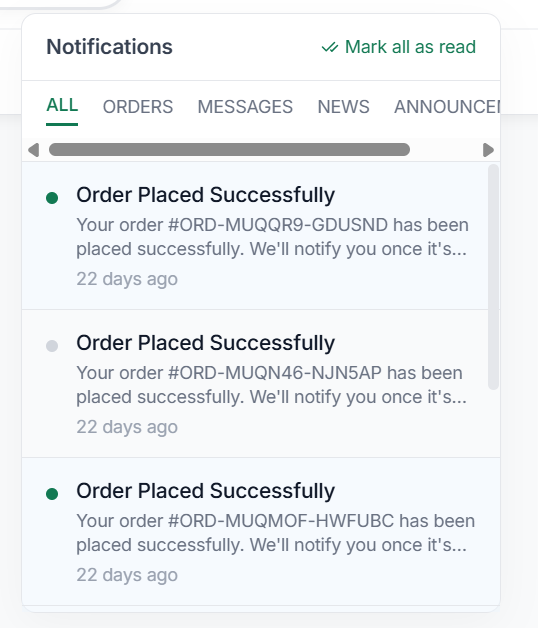
- Use the tabs to switch between All, Orders, Messages, News, and Announcements.
- Each notification shows a title, a short message, and when it was received. For example, “Order Placed Successfully” confirms a new order and its order number.
- Select Mark all as read to clear the unread markers.